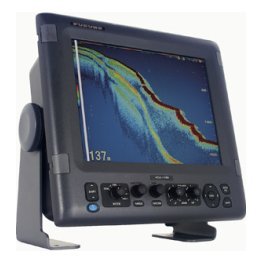
Among the fish finders anglers talk about most, the Humminbird Helix fish finder line stands out for offering a wide choice of screen sizes and sonar features at several price levels. Humminbird has a strong reputation for imaging sonar, and the Helix range is generally aimed at anglers who want detailed pictures of structure along with CHIRP sonar and built-in GPS. Because model details change, this guide stays general. It explains what the Helix family is designed to do, who tends to buy it, which features to compare on a product page, how to match a model to your boat, how to install and set it up, and how to learn the screen so that the extra features actually help you catch fish rather than simply filling the display.
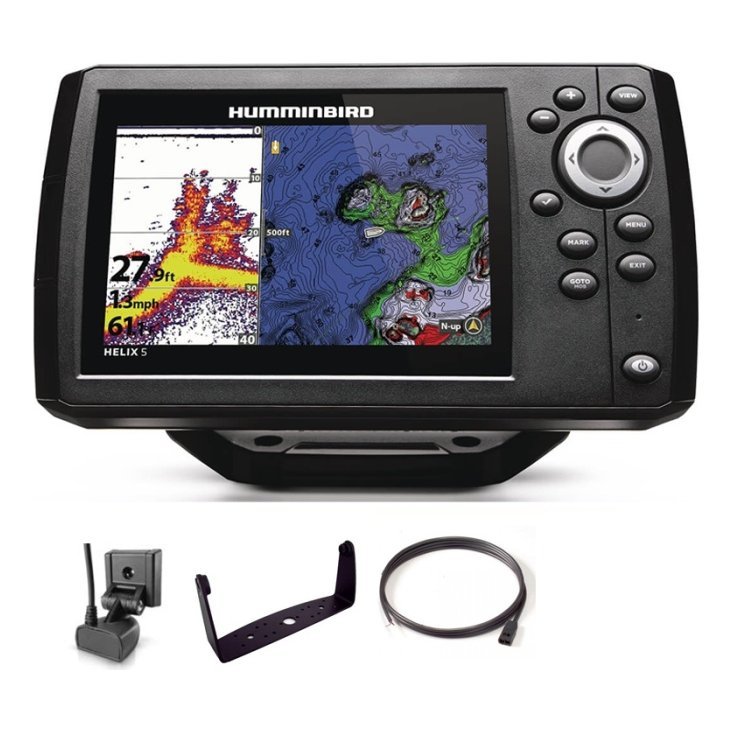
Where the Helix fits among fish finders
A feature-rich mid-range choice
The Helix line is generally positioned as a step up from basic fish finders, with a broad range of screen sizes and features. Anglers choose it when they want more than a simple depth reader, such as imaging, mapping and a bigger, clearer display.
Who it suits
It suits anglers who fish structure, such as timber, brush and rock, and who want to see it clearly. It also suits boaters who like to run sonar and a map side by side on a single screen. Beginners can use it too, though it rewards time spent learning.
Small boats to larger boats
Different screen sizes in the family let you match the display to a jon boat, a bass boat or a pontoon. Check each model’s size and mounting options carefully, since the larger screens need more room and more power.
Features to compare on a product page
Sonar and imaging
Check whether the model includes CHIRP, down imaging and side imaging. Our side imaging vs down imaging guide explains the differences, and our CHIRP fish finder guide explains the 2D side. Match the sonar to the way you fish rather than buying every feature.
GPS and mapping
Look for built-in GPS and the maps included or supported. If you fish large water, detailed charts add safety and planning value. Our fish finder with GPS guide discusses what GPS adds in practice.
Screen size and brightness
Think about your console space, your viewing distance and the sun. Our 7 inch fish finder guide helps you decide whether a mid-size screen is enough or whether you should go bigger.
Transducer and mounting
Confirm which transducer is included and whether it supports the sonar views you want. Our transducer guide explains the mounting choices, and getting this right matters as much as the display.
Understanding Humminbird’s imaging
Why imaging is a highlight
Humminbird is well known for imaging sonar, which draws a picture-like view of the bottom and structure. This helps you recognise timber, brush and rock without reading abstract marks.
Using imaging with 2D sonar
Most anglers run imaging next to 2D sonar so they can identify structure and fish together. For example, a split screen might show down imaging on one side and 2D CHIRP on the other.
Learning to read it
Imaging pictures take practice, so begin on water you know. Drive over a dock or a point and see how it looks. Our how to read a fish finder guide is a good companion.
Compare with other options
Helix versus Lowrance
Both brands are strong, and the choice often comes down to interface and preference. Read our Lowrance vs Humminbird guide and our Lowrance Eagle guide to compare approaches.
Helix versus Garmin
Garmin’s compact units are another route, particularly for anglers who want a simple, bright screen. See our Garmin Striker Vivid guide.
Choose by fit, not by name
Compare the exact models you are considering, including total cost with a transducer, a mount and any charts. The best unit is the one that suits your boat and your fishing.
Match a model to your boat
Jon boats and small boats
A compact or mid-size Helix-class screen with GPS and a transom transducer is a good fit. See our jon boat guide and small boat electronics guide.
Pontoons and family boats
A mid-size screen with a chart and sonar suits boats that mix fishing and cruising. See our pontoon boat guide.
Bass boats
Larger screens and a second display at the bow are common. See our bass boat electronics guide for a typical layout.
Install and set up well
Mounting and wiring
Plan the display position, power and transducer location before you drill. Our installation guide and wiring guide walk through the steps. Use a fused supply and keep the transducer cable away from noisy wires.
First-time setup
Set units and language, confirm the transducer type and let GPS find satellites. Then run a short trip on familiar water to check depth and imaging.
Keep software current
Check for software updates at home and install them before the season.
Use the Helix well
Mark waypoints with a system
Name waypoints clearly and group them by lake and season. Our marine GPS waypoints guide explains how.
Build useful screens
Create saved layouts for searching, fishing structure and running. See our fish finder settings guide.
Care for the unit
Rinse after salt use, keep connectors clean and store the display away from extreme heat. See our maintenance guide.
Common mistakes
- Buying imaging without understanding how to read it.
- Choosing a screen that does not fit the console.
- Forgetting to check the transducer type.
- Skipping a clean, fused power supply.
- Using default settings forever.

A practical example: structure fishing on a mid-size lake
Imagine you fish bass and crappie on a lake with plenty of timber and brush. You plan to scan the banks and channel edges, mark promising structure and then fish it closely. A Helix-class unit with side imaging and down imaging would let you search quickly and inspect carefully. You would run side imaging along the bank at a steady speed, watch for objects and mark them as waypoints. Then you would return with down imaging to see how each object sits and whether fish are on it. After each trip you would review your waypoints and delete weak ones. This workflow uses the strengths of the Helix concept without needing every option.
Time on the water beats more features
Even a premium unit gives poor results if you rarely learn it. Spend your first outings practising on known spots, and gradually add features such as custom pages and advanced settings. The goal is to see more fish and structure, not to master every menu on the first day.
Ask for help when you need it
If a product page leaves you unsure about the sonar views, the maps or the mounting, ask before you buy. Send us your boat details and what you fish for through the contact page, and we will help you narrow the options.
Budgeting for a Helix-class setup
The display is only part of the cost. Include the transducer if it is not bundled, a mount, a fused power feed, a battery of suitable size and any charts you want. If you plan to add a second screen later, check that the model can network. Our marine electronics budget guide shows how to plan the whole system, so that you do not finish the install and then discover a missing part.
Frequently asked questions
Does the Helix have side imaging?
Some models do and some do not. Check the product page for the exact sonar features.
Is the Helix good for beginners?
Many beginners use it, but it rewards learning. Start with automatic settings.
Does the Helix include GPS?
Many models do. Check the model details.
Can I use a Helix in saltwater?
Check the model details and rinse after use.
Choose the Helix model that fits
The Humminbird Helix fish finder range offers a flexible choice for anglers who want imaging, GPS and clear screens. Check each model’s sonar, screen size and transducer, match it to your boat and take time to learn it. Browse Humminbird units in our shop and contact us for help choosing the right model.
Related reading from Fishtrail Outfitters
- Side Imaging vs Down Imaging: Which Sonar View Do You Need?
- Lowrance vs Humminbird: Which Fish Finder Brand Is Right for You?
- Fish Finder Settings Guide: The Controls That Make Your Screen Clearer
- Fishing Docks With Sonar: Find Fish Around Docks, Bridges and Piers
Products mentioned in this guide
- GPS Fishfinder Humminbird Helix 5 G3 CHIRP DS 2D + Sonar 140/240 KHz
- GPS Fishfinder Humminbird Helix 5 G3 CHIRP XD 2D + Sonar 50/200 KHz
- GPS Fishfinder Humminbird Helix 5 G3 CHIRP DI + Sonar 140/200/455 KHz
Further reading: Take Me Fishing: how to get started and where to fish
Questions before you buy? Contact Fishtrail Outfitters or browse the shop.