Deeper sonar devices changed how many anglers think about fish finders by shrinking the technology into a small, castable unit. Instead of a display and a transducer fixed to a boat, a castable sonar floats on the surface, sends sonar data wirelessly to a phone or tablet and can be cast from the shore, a dock, a kayak or even through a hole in the ice. That makes sonar available to anglers who do not own a boat or do not want a permanent installation. This guide explains how castable sonar works, who it suits, how to use it from the bank, the kayak and the ice, what to check on a product page, how to read the data it provides and how to care for it. Always check the specific model details, because features and requirements vary.
What Deeper sonar is
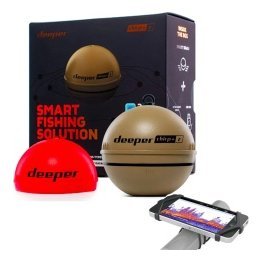
A small floating transducer
The device is a compact, waterproof unit that floats and sends sonar pulses downward. It connects wirelessly to your phone or tablet.
An app as the display
The phone app shows depth, bottom contour, fish marks and often temperature. Some models also include GPS for mapping.
Different from boat units
It does not need a battery bank or wiring, but it relies on wireless connections and your phone, so range and phone battery matter.
Who it suits
Shore and bank anglers
A castable unit lets you scan the water beyond your casting range, finding drop-offs, weeds and depth changes. See our portable fish finder guide.
Kayak and small-boat anglers
It can be used from a kayak or boat as a quick, flexible sonar. See our kayak fish finder guide.
Ice anglers
It can be used through ice holes in some models. See our ice fishing fish finder guide.
Travellers and casual anglers
Because it is compact and needs no installation, it suits anglers who fish in many places.
How to use it from the shore
Cast and scan
Cast the unit out, let it settle and retrieve slowly while watching the app. The device records depth and bottom data as it moves.
Build a map
Some versions create a depth map of the area you scan. Use it to find structure and plan casts.
Mark spots
Use the app to note drop-offs and weed edges. See our marine GPS waypoints guide for habits that carry over.
Be patient
Scanning takes time. Work along the shore in a pattern to cover the water.
How to use it from a kayak or boat
Float it or mount it
You can cast it alongside the boat or use a mount designed for the device where available.
Keep a steady pace
A steady, slow pace gives the cleanest data.
Protect your phone
Use a waterproof case and a lanyard. Keep the phone in a visible, secure location.

Reading the data
Depth and bottom
The app shows depth and a bottom line. See our how to read a fish finder guide.
Fish and bait marks
Marks appear as arches or icons. Treat icons as a guide and check against the raw display where possible.
Structure and weeds
Look for bumps, ledges and changes in bottom hardness.
What to check on a product page
Model and features
Check whether the model includes GPS, mapping and temperature. Features differ between versions.
Phone compatibility
Make sure your phone or tablet works with the app and the device’s wireless connection.
Range and battery
Check the wireless range and battery life, and plan for charging. See our battery tips for general guidance on keeping devices powered.
Ice and boat accessories
If you plan to fish ice or use a boat mount, check that the model supports it.
Strengths and limits
Strengths
Compact, portable, no installation and good value for shore anglers.
Limits
Small screens, reliance on a phone and wireless connection, and less detail than larger boat units. Range can be limited by signal, wind and waves.
Complement, not replacement
For many anglers, a castable device complements a boat fish finder rather than replacing it.
Care and maintenance
Rinse and dry
Rinse after saltwater use and dry thoroughly. See our maintenance guide.
Charge and store
Follow the manufacturer’s instructions for charging and storing the device.
Protect from impact
Store it in a padded case to avoid scratches and knocks.
Common mistakes
- Casting too far and losing the signal.
- Scanning too fast.
- Forgetting to charge the device.
- Using a phone without a waterproof case.
- Ignoring wind and waves.
A shore-fishing session with castable sonar
Imagine arriving at a pond or reservoir bank with no boat. Charge your device and phone, pack the unit in a padded case and bring a waterproof phone pouch. At the water’s edge, connect the device to the app and cast it out along the bank, then retrieve it slowly, watching depth and structure appear on the phone. Make a few casts in a fan pattern to cover water in front of you. Note where the bottom drops, where weeds grow and where the depth changes quickly. Choose two or three spots that look promising and fish them with your usual lures, comparing results with what the sonar showed.
Use the data to plan casts
Knowing the depth lets you choose lures that run at the right level, and knowing where a drop-off starts tells you where to aim. A few minutes of scanning often turns a random cast into an informed one.
Record your findings
Take a screenshot or notes of the depth map and conditions. Over time you will build a picture of the water that helps you on every return visit. Our fishing journal guide shows how to record useful notes.
Tips for better readings
Keep the unit away from submerged weeds that can foul it, retrieve slowly and steadily and avoid retrieving over areas with heavy snags. Make sure the phone is close enough to the water for a stable connection, and avoid blocking the signal with your body or equipment. In windy conditions, waves can disturb readings, so wait for calmer moments or move to a more sheltered area. Check for software updates for the app, which often improve performance and add features. With practice, you will learn how the device behaves in different conditions and get the most from this compact tool.
Frequently asked questions
Do I need a boat to use Deeper sonar?
No. It is designed for casting from the shore.
Does it work in saltwater?
Check the model details and rinse after use.
Does it need a phone?
Typically yes, because the app is the display.
Can it replace a boat fish finder?
It can be a useful alternative for some anglers, but boat units offer larger screens and more detail.
A flexible way to see underwater
Deeper sonar gives shore, kayak and ice anglers a quick, affordable window under the surface. Learn the app, scan patiently and use what you find to guide your casts. Browse fish finders and portable sonar in our shop and contact us if you would like help choosing a device.
Related reading from Fishtrail Outfitters
- Portable Fish Finder Guide: Wireless, Handheld and Kit Options Explained
- Ice Fishing Fish Finder Guide: Choose, Set Up and Read Sonar Through Ice
- Kayak Fish Finder Guide: How to Choose and Mount One on a Kayak
- Best Fish Finder for Beginners: How to Choose Your First Sonar
Products mentioned in this guide
Further reading: Take Me Fishing: how to get started and where to fish
Questions before you buy? Contact Fishtrail Outfitters or browse the shop.