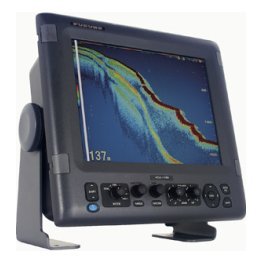
A CHIRP fish finder is one of the most common upgrades anglers talk about, yet many people buying one could not explain what the word actually means. CHIRP stands for Compressed High Intensity Radar Pulse, and in a fish finder it describes a sonar that sweeps through a band of frequencies instead of firing one single tone. The result is a cleaner, more detailed picture of fish, bait and bottom. This guide explains how CHIRP sonar works in plain language, how it compares with traditional sonar, and how to decide whether a CHIRP unit is right for your boat and your water.

How a traditional fish finder works
To understand why CHIRP matters, start with the older approach. A traditional fish finder transmits a short burst of sound at one fixed frequency, then listens for the echo. The time it takes for the echo to return tells the unit how far away the object is, and the strength of the echo tells it something about how large or dense that object is.
The single-frequency limit
A single-frequency pulse is a bit like shining a flashlight with one beam colour. It works, but fine detail can blur together. Two fish close together, or a fish hugging the bottom, can merge into one mark because the pulse cannot tell them apart.
Where traditional sonar still works well
Traditional sonar is simple, proven and perfectly capable in many conditions. Many anglers have caught fish for years with it. CHIRP is an improvement in detail, not a requirement for success.
What makes a CHIRP fish finder different
A CHIRP fish finder sends a longer pulse that sweeps smoothly across a range of frequencies, from low to high. Each part of the sweep returns its own echo, and the unit combines them into a richer picture.
A wider band of information
Because the pulse covers many frequencies, the unit collects more information from every ping. Different frequencies reflect differently from different targets, so the combined return helps separate fish from structure and one fish from another.
Better target separation
Target separation is the headline benefit. Fish close to the bottom, to timber or to each other show up as distinct marks rather than a single smear. For an angler picking apart a brush pile or a drop-off, that clarity is valuable.
Cleaner screen, less clutter
CHIRP processing tends to reduce the noise that makes a screen look grainy. You may find you need less manual gain adjustment, which is a real advantage for beginners.
Frequencies: low, high and what to expect
Every sonar trades range for detail. Lower frequencies travel deeper and cover a wider cone. Higher frequencies show finer detail in a narrower cone but do not reach as deep. A CHIRP fish finder usually offers more than one band so you can choose.
Low-frequency CHIRP
Use low-frequency CHIRP for deeper water or to cover a wider area. It is the right pick for finding structure and large schools.
High-frequency CHIRP
Use high-frequency CHIRP in shallower water when you want maximum detail, such as picking out individual fish near cover.
Switching or combining bands
Many units let you view two bands side by side. If you are new to this, our article on fish finder frequencies explains the options step by step.
Is a CHIRP fish finder worth it?
For most anglers buying today, yes. CHIRP has become common even on entry-level units, so you often do not pay a large premium for it. The question is less whether CHIRP is worth having and more how much to spend on the rest of the package.
Who benefits most
- Anglers fishing around structure such as timber, rock or docks.
- Anglers who want to identify baitfish and predators separately.
- Beginners who want a cleaner, easier-to-read screen.
- Anglers fishing deeper water where signal quality matters.
When you may not need to prioritise it
If you fish a small, shallow pond and only want a depth reading, a simple unit may be enough. Even so, many buyers choose CHIRP for the extra headroom as their fishing grows.
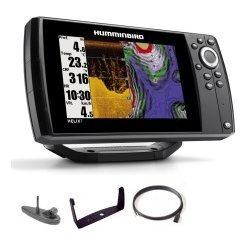
CHIRP and imaging: how they fit together
CHIRP is a feature of the traditional 2D view, and many units also add down imaging and side imaging. These are different technologies, and they complement each other rather than compete.
2D CHIRP for fish
Use 2D CHIRP to find and identify fish and to read the depth and bottom hardness.
Imaging for structure
Use down imaging and side imaging to see structure in a picture-like view. Our comparison of side imaging and down imaging shows when each is most useful.
The transducer still decides your results
No matter how good the CHIRP processing is, the transducer must be matched to the unit, mounted well and sitting in clean water. A CHIRP-capable display with the wrong transducer will not give you the full benefit.
Check compatibility
Always confirm which transducer comes in the box and which connector the display uses. If anything is unclear on a product page, contact us and we will help you check.
Mount for clean water
Bubbles and turbulence under the transducer disrupt any sonar signal. Mount it where water flows smoothly at speed. Our transducer guide covers mounting in detail.
How to get the best picture from a CHIRP fish finder
Even a great unit benefits from sensible settings. Start with automatic modes and make one change at a time.
Start in auto
Let the unit set range, gain and colour while you learn the screen. Auto modes are designed to give a usable picture right away.
Adjust gain and contrast gently
If the screen looks noisy, reduce gain slightly. If marks look faint, raise it. Small changes go a long way.
Use split screens
Run CHIRP beside a map or an imaging view so you can match marks to places on the water.
Save a good setup
When you find a screen layout that works, keep it. Consistency makes it easier to recognise what you see from trip to trip.
Reading CHIRP returns: what to look for
CHIRP returns can look slightly different from traditional sonar. Marks tend to look sharper, with clearer arches and a more defined bottom line.
Fish
Fish appear as arches or short marks, often with a thicker centre when they pass through the strongest part of the cone. Larger fish usually return stronger signals.
Baitfish
Baitfish show as clouds, balls or vertical streaks. Predators often sit just below or beside them.
Bottom hardness
A thicker, brighter bottom line often suggests a harder bottom, while a thinner line suggests soft mud or silt. Use this to find hard spots that attract fish.
CHIRP in different fishing situations
Sonar does not behave the same everywhere, and knowing how CHIRP responds helps you set expectations.
Shallow lakes and ponds
In shallow water the cone is small and the bottom is close, so high-frequency CHIRP gives the best detail. Expect to see individual fish near cover and weed edges.
Deep reservoirs and open water
In deeper water, low-frequency CHIRP carries the signal further and shows schools and suspended fish. Slow down so the unit has time to build a clear picture.
Rivers and current
Moving water carries debris and bubbles that clutter any sonar. CHIRP helps by separating real targets from noise, but you still need a clean transducer mount.
Saltwater and coastal fishing
Salt water absorbs signal, so range is often shorter than the same unit gives in fresh water. CHIRP is still helpful for picking out bait and structure.

Care and maintenance for a CHIRP setup
A CHIRP fish finder is only as reliable as its connections and its transducer face. A few minutes after each trip keeps it working season after season.
- Rinse the transducer and cables with fresh water after each outing.
- Keep the transducer face clean and free of slime or growth.
- Check connectors for corrosion and keep them dry.
- Store the display out of direct sun and extreme heat when not in use.
Common CHIRP myths
- Myth: CHIRP finds fish for you. Reality: it gives a clearer picture, but you still choose where to fish.
- Myth: More frequencies are always better. Reality: the right band for your depth and goal matters most.
- Myth: You can skip the transducer details. Reality: the transducer is half the system.
Choosing a CHIRP fish finder for your boat
Think about your water, your boat and your budget. For small boats and kayaks, compact CHIRP units with a modest screen are plenty. For bigger boats, a larger screen with CHIRP and imaging lets you do more at once.
Pair CHIRP with GPS if you can
GPS lets you mark productive spots where CHIRP shows fish or structure. Read our guide to a fish finder with GPS for ideas.
Compare brands
At Fishtrail Outfitters you can browse CHIRP-capable units from brands including Lowrance, Humminbird, Garmin, Deeper, Furuno and more. Open the product page for each and compare screen size, sonar options and what is included.
Frequently asked questions
What does CHIRP stand for?
CHIRP stands for Compressed High Intensity Radar Pulse. In a fish finder it means the sonar sweeps through a range of frequencies.
Is a CHIRP fish finder better than a regular one?
Generally it provides cleaner target separation and a clearer picture, especially around structure and near the bottom.
Do I need CHIRP for shallow water?
Not strictly, but many anglers still prefer it because it makes the screen easier to read.
Does CHIRP work in saltwater?
Yes, provided the unit and transducer are suited to saltwater use. Check the product details for your intended water.
Final thoughts on choosing a CHIRP fish finder
A CHIRP fish finder gives you a sharper, cleaner view of what is beneath your boat, and that clarity helps both beginners and experienced anglers. Pair it with a well-mounted transducer, learn the basic settings and you will get more from every trip. Ready to compare units? Browse fish finders in our shop, or contact us if you would like help matching a CHIRP model to your boat.
Related reading from Fishtrail Outfitters
- How Does a Fish Finder Work? Sonar, Transducers and Echoes Explained
- Fish Finder Frequency Explained: 50 kHz, 200 kHz and CHIRP Bands
- Best Fish Finder for Beginners: How to Choose Your First Sonar
- Portable Fish Finder Guide: Wireless, Handheld and Kit Options Explained
Products mentioned in this guide
- GPS Fishfinder Humminbird Helix 5 G3 CHIRP DS 2D + Sonar 140/240 KHz
- GPS Fishfinder Humminbird Helix 5 G3 CHIRP XD 2D + Sonar 50/200 KHz
- GPS Fishfinder Humminbird Helix 5 G3 CHIRP DI + Sonar 140/200/455 KHz
Further reading: Take Me Fishing: how to get started and where to fish
Questions before you buy? Contact Fishtrail Outfitters or browse the shop.