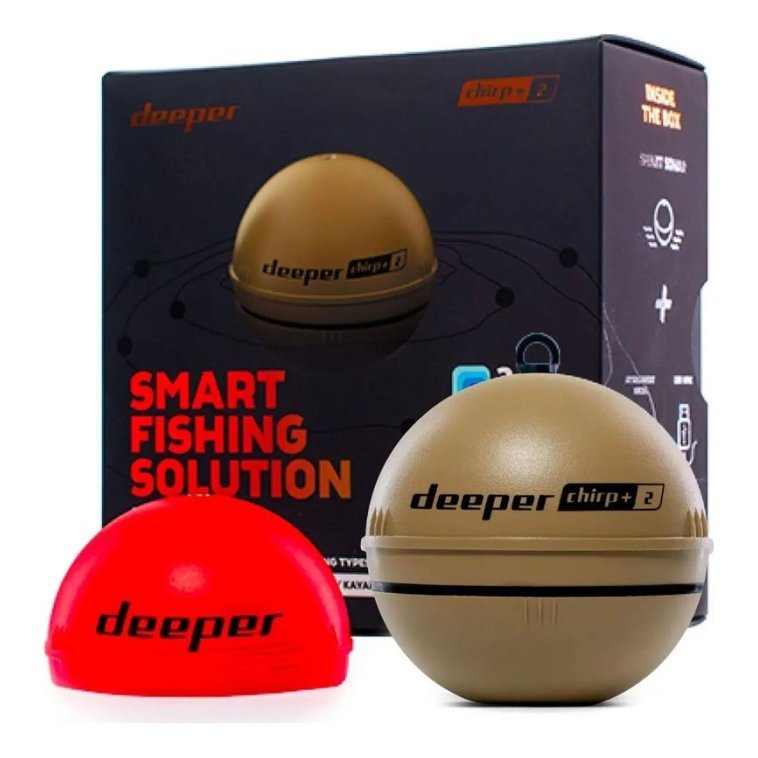
Opening a new unit and discovering that something is missing is a frustrating way to start a boating season, which is why understanding fish finder packages matters before you buy. Some boxes include the display, a transducer, a mount and a power cable, while others contain only the head unit, leaving you to buy the rest. Differences between bundles can be large, and similar-looking listings may have different contents. This guide explains what is usually included, what is often left out, how to read package descriptions, which accessories you may still need, how to plan installation, and how to check everything when the box arrives. Always rely on the listing for exact contents.

What fish finder packages usually include
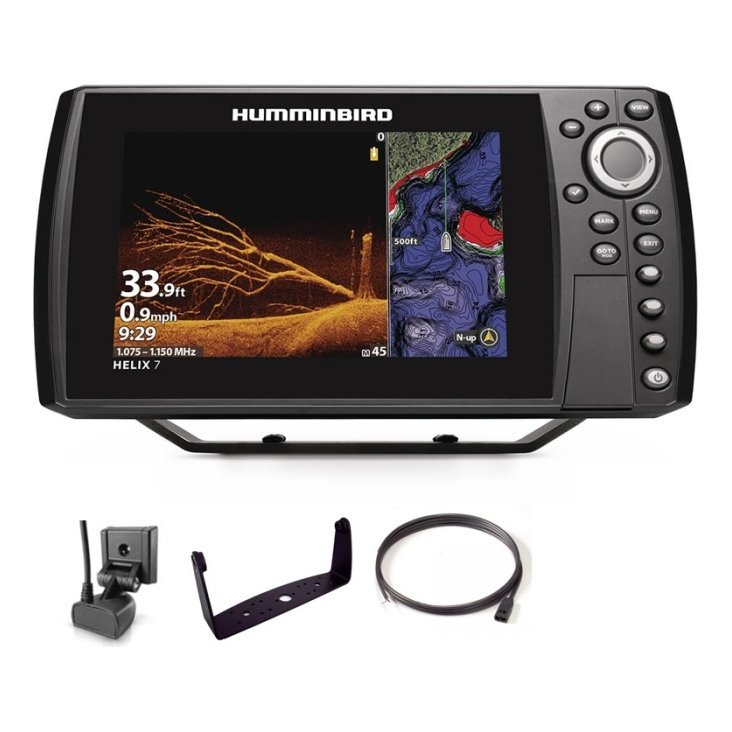
A typical package contains a display unit, a power cable, a transducer, mounting hardware and a quick-start guide. Some add a cover, a tilt-and-swivel bracket or a carry case. Others bundle charts or additional sensors. Because contents vary, always read the product listing and check part numbers, as explained in our SKUs and part numbers guide.
The display unit
This is the main screen and electronics. Check screen size, resolution and whether GPS or mapping is built in.
The transducer
The transducer sends and receives sonar signals. Some packages include one, others require you to choose it separately. See our fish finder transducers guide.
Power cable and fuse
Most units include a power cable, but the fuse and wiring to the battery may be separate. See our boat wiring basics guide.
Mounts and hardware
Mounting brackets and screws may be included, but not always the right ones for your boat. See our fish finder mounting guide.
What is often not included
Even a good package may leave out items you need. Common missing items include extension cables, adapters, a battery, a power switch, fuses, a transducer mount for your hull type, a sun cover, and tools. Memory cards for charts or logging may also be sold separately. Check the listing and the manual before assuming something is in the box.
- Extra cable length.
- Battery and charger.
- Transducer brackets for specific hulls.
- Sun cover and protective case.
- Memory card for charts or data.
- Tools and sealant.
How to read package descriptions
Look for a section labelled included items, in the box or package contents. Read the title carefully, as words such as with transducer or head unit only make a big difference. Compare the photos with the list, and check the part number against the manufacturer’s information. If anything is unclear, ask us through the contact page before ordering. Our shop pages list product details so you can compare.
Watch for similar names
Some bundles have names that differ by only a word or a letter. Compare the full contents rather than relying on the name.
Check regional differences
Charts, power adapters and frequencies can vary by region. Confirm that the package suits your location.
Choosing the right transducer in fish finder packages
Packages may include transom-mount, trolling motor, in-hull or through-hull transducers, depending on the unit. Choose the type that suits your boat and fishing. A jon boat, pontoon and bass boat may each need a different approach, as covered in our guides to jon boats, pontoon boats and bass boats. If the included transducer does not suit your boat, you may need to buy another.
Check cable length
Transducer cables must reach from the transducer to the display. Measure your route before you buy.
Plan installation before the box arrives
Think about where the display, transducer and power source will go. Measure the space, plan cable routes and consider whether you need extra hardware. Gather tools and sealant, and check that your battery and fuse are suitable. Test the unit on a bench before mounting it. If you are unsure about wiring or drilling, ask a professional. See our spring electronics checklist.
Keep the packaging
Save the box and packing until you have installed and tested everything. If something is missing or faulty, you will have the packaging and reference numbers.
Inspect the box when it arrives
Unpack carefully and compare the contents against the listing. Check for visible damage, missing parts and the correct model. Take photos of anything unusual, and keep the labels. If there is a problem, contact us promptly with your order details and photos. Do not start drilling until everything is checked.
Register and update
Check the manufacturer’s website for firmware and chart updates, and register the product if recommended.
Add useful extras
Once the main system works, consider extras such as a sun cover, a power switch, a spare fuse kit and a protective case. Cameras and mounts can also add value. See our GoPro boat mount guide and summer electronics guide.

Common mistakes
- Assuming a transducer is included.
- Forgetting to measure cable lengths.
- Ordering a bundle for the wrong boat type.
- Starting installation before checking contents.
- Discarding packaging too soon.
A box-opening checklist
When the delivery arrives, clear a table and lay out a towel. Open the box and take out each item, ticking it off against the listing. Check the display for scratches and the screen for protective film. Inspect the transducer face and cable. Count screws, washers and brackets. Look at the power cable and any inline fuse holder. Read the quick-start guide to confirm what the manufacturer expects you to have. Photograph everything, particularly labels and part numbers, and store the photos with your order confirmation. Power up the unit with a safe bench supply if possible, and confirm that it starts. Only then should you plan the first drill hole.
Think about spare parts
Even if everything is included, consider buying a few spares such as fuses, screws and a short extension cable. They are cheap compared with a lost trip.
Keep a record of what you added
Note what you bought in addition to the package, with part numbers and dates. This makes future upgrades easier and helps if you need support.
Frequently asked questions
Do all fish finder packages include a transducer?
No. Some do, and some do not, so read the listing.
Do I need a separate battery?
Often yes. Most packages do not include one.
Are mounts included?
Basic mounts often are, but check that they suit your boat.
Can I add accessories later?
Yes. Plan for them and check compatibility.
Know before you buy
Reading fish finder packages carefully prevents missing parts, delays and frustration. Check contents, match the transducer to your boat and plan installation before the box arrives. Browse fish finders and accessories in our shop and contact us if you would like help checking a package.
Related reading from Fishtrail Outfitters
- Fish Finder for Pontoon Boats: Mounting, Power and Transducer Tips
- Fish Finder Transducer Guide: Types, Mounting and Getting a Clear Signal
- How to Install a Fish Finder: Step-by-Step Guide for Any Boat
- How Does a Fish Finder Work? Sonar, Transducers and Echoes Explained
Products mentioned in this guide
- Lowrance Eagle 5 CHIRP Splitshot Gps Fishfinder + 455/800 KHz Transducer
- Lowrance Eagle 5 CHIRP HDI Gps Fishfinder + 83/200/455/800 KHz Transducer
- Lowrance Eagle 5 CHIRP HDI Gps Fishfinder + 50/200/455/800 KHz Transducer
Further reading: GoPro official website · Take Me Fishing: how to get started and where to fish
Questions before you buy? Contact Fishtrail Outfitters or browse the shop.