
A fish finder chartplotter combo puts sonar, GPS and charts on a single screen, and for most anglers it is the most practical way to equip a boat. Instead of juggling two displays, two power feeds and two sets of controls, you get one unit that shows what is under the boat and where the boat is, side by side. But combos are not right for every setup, and the choices within the category are wide. This guide explains how a combo works, what you gain and give up, which features to compare and how to decide between a combo and separate units for your boat and budget.

What is a fish finder chartplotter combo?
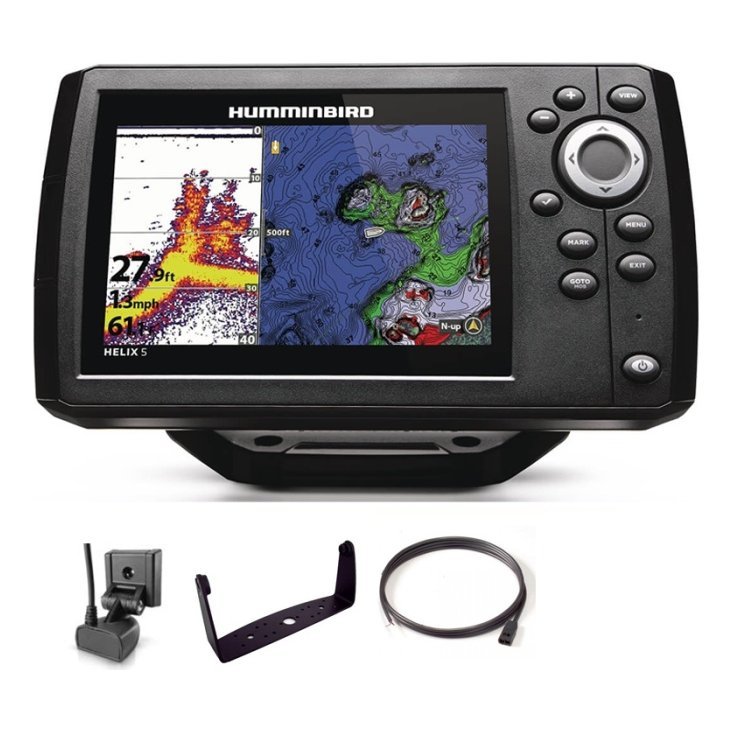
A combo is a single device that includes a sonar module, a GPS receiver and a chart display. You can view sonar, charts or both in split screens.
Sonar and charts together
The sonar side shows depth, fish and structure, and the chart side shows your position, routes and waypoints. When you spot something interesting on sonar, you mark it on the chart with a button press.
One screen, many views
Most combos let you choose full-screen sonar, full-screen chart or split views. Some also support several layouts that you can save and switch between.
Common features
Typical features include CHIRP sonar, imaging options, built-in maps, waypoint storage and support for extra charts. Details vary by model, so read the product page carefully.
Benefits of a combo unit
There are good reasons that combos dominate fishing boats.
Saves space
A single screen takes less console room, which is valuable on small and mid-size boats.
Simpler wiring
One power connection and one set of cables mean less to install and less to go wrong. Our boat wiring basics can help you plan it.
Lower overall cost
Buying one unit is often cheaper than buying a separate fish finder and chartplotter of equal quality.
Integrated workflow
Marking spots, navigating to them and checking sonar happens in one place, making fishing faster and more intuitive.
Drawbacks to consider
A combo has trade-offs.
Single point of failure
If the unit fails, you lose both sonar and navigation. Carry a backup, such as a handheld GPS or a compass.
Screen space is shared
Split screens show less of each view. On a small screen, chart detail can feel cramped.
Limited expansion on entry models
Cheaper combos may not network with other devices or accept advanced sonar. Check your future needs.
Combo versus separate units
Both approaches suit different boats.
When a combo is the best choice
Small and mid-size boats, kayaks with compact units, anglers on a budget and anyone who wants a simple, integrated setup.
When separate units make sense
Larger boats with consoles that can hold two screens, serious tournament anglers and boaters who want redundancy. Read our bass boat electronics guide for a bigger setup.
Networking as a middle path
Two networked units can share sonar and chart data, giving the benefits of both. Check compatibility before buying.
Features to compare
Narrow the field with a short list.
Screen size and brightness
Choose a size that fits the console and a screen you can read in the sun. Our 7 inch fish finder guide helps with sizing.
Sonar type
CHIRP, down imaging and side imaging each add value. See our guides to CHIRP fish finders and imaging sonar.
Mapping and charts
Look at the built-in maps and what extra charts you can add. Good charts add safety and fishing detail.
Transducer included
Confirm what comes in the box and how it mounts. Our transducer guide explains the options.
Controls
Touch, keys or both? Choose what works in your conditions.
Installing a combo
Installation follows the same steps as any fish finder, with a few extras.
Position the display
Choose a spot you can see easily and reach without leaning.
Mount the transducer
Mount it in clean water and test it. See how to install a fish finder.
Place the GPS antenna
Make sure the antenna has a clear view of the sky.
Set up the first time
Confirm units, transducer type and chart region.
Using a combo effectively
A combo is most useful when you build good habits.
Use split screens
Run sonar beside the chart to match marks to places.
Name waypoints clearly
Short, descriptive names help you organise spots. Our GPS waypoints guide offers tips.
Review tracks after trips
Use your tracks to see where you fished and where you did not.
Save layouts
Create screen layouts for trolling, structure fishing and cruising.
Combo sizes for different boats
Kayaks and small boats
Compact combos suit these craft. See our kayak fish finder guide.
Jon boats and pontoons
Mid-size combos give a good balance. See our jon boat and pontoon guides.
Larger fishing boats
Larger screens allow richer split views and networking.
Questions to ask before you buy a combo
A few practical questions keep you from buying the wrong unit. Will it fit the space on my console or deck? Does it include the transducer I need, or is it sold separately? Which charts are included and which cost extra? How many waypoints and routes can it store, and can I back them up to a card? Is the screen readable at the angle I will actually use? What power supply and fuse does it need? If any answer is unclear, check the product page and ask our team, because a short conversation now prevents disappointment later.
Making a combo last
A combo is a long-term tool, so treat it that way. Keep the software up to date, back up waypoints regularly and rinse the display and cables after salt exposure. Protect the screen from scratches with a cover when the boat is stored, and keep the unit out of extreme heat. If the unit is removable, take it home between seasons and store it in a dry place. Good care means the same combo can serve you through many seasons of fishing and navigating.
A day on the water with a combo unit
Seeing how a combo is used makes the benefits concrete. Imagine launching at a reservoir you know only slightly. Before leaving the ramp you mark it as a waypoint, set your chart view and choose a split screen with the map on the left and sonar on the right. You drive towards a point shown on the chart, watching the sonar as the bottom rises. When a ledge shows up with bait along its edge, you press the mark button and the chart records the exact spot.
Working a spot properly
You then make a slow pass back over the waypoint, keeping an eye on both views. The chart tells you where the boat is in relation to the ledge, and the sonar tells you whether fish are on it. If you find fish, you can position the boat for the best cast without guessing. If you do not, the track on screen shows which water you have already covered, so you can move on without repeating yourself.
Reviewing the day
Back at home, you review your waypoints and tracks, deleting weak marks and renaming good ones. Over several trips these records build into a detailed personal map of the water, and that accumulated knowledge is the real payoff of owning a combo.
Mistakes to avoid when buying
Several mistakes appear again and again. Buying a screen too large for the console leaves you with an awkward install. Forgetting to check the transducer means arriving home with a display that cannot see what you wanted. Ignoring chart coverage can leave you with a beautiful map of the wrong region. And skipping a backup, such as a compass or a handheld GPS, leaves you exposed if the unit fails. A few minutes of checking before you buy prevents all of these and leaves you free to enjoy the unit.
Frequently asked questions
Is a fish finder chartplotter combo better than separate units?
For most small and mid-size boats, yes. It is simpler and often cheaper. Larger boats may prefer separate units.
Can I add charts to a combo?
Most combos accept additional charts, but check the model.
Do combos work in saltwater?
Many do. Check product details and rinse after use.
Do I need a separate GPS if I have a combo?
No, but a handheld backup is wise.
Making the final choice
A fish finder chartplotter combo gives anglers sonar, navigation and fishing tools in one convenient package. Choose a screen you can read, a sonar type that suits your water and a unit that is easy to install and learn. Browse combos in our shop or contact us for help choosing.
Related reading from Fishtrail Outfitters
- Fish Finder vs GPS Marine: Which Category Do You Need First?
- Kayak Fish Finder Guide: How to Choose and Mount One on a Kayak
- Garmin Marine GPS Guide: Choosing a Garmin Chartplotter or Fish Finder
- Night Fishing Electronics: Use Sonar, GPS and Lights Safely
Products mentioned in this guide
- Fishfinder Garmin Striker Vivid 4CV + Sonar 77/200/455/800 KHz
- Fishfinder Garmin Striker Vivid 5CV + Sonar 77/200/455/800 KHz
- Fishfinder Garmin Striker Vivid 7CV + Sonar 77/200/455/800 KHz
Further reading: U.S. Coast Guard Navigation Center · Take Me Fishing: how to get started and where to fish
Questions before you buy? Contact Fishtrail Outfitters or browse the shop.
