Anglers and boaters often look to Garmin marine GPS products when they want reliable navigation along with sonar features in the same unit. Garmin is a well-known name in GPS, and its marine range covers compact fish finders for small boats as well as larger chartplotters for bigger boats. That breadth makes shopping easier in one way and harder in another, because there are many possible choices. This guide explains how to think about a Garmin purchase: what the main product types are, which features to compare, how to match a unit to your boat and your water, and how to install and use it well.

What Garmin marine GPS covers
Garmin’s marine range spans several kinds of device, and knowing the categories helps you choose.
Chartplotters
Chartplotters show your position on a chart, plot routes and store waypoints. Some also include sonar for fishing.
Fish finders with GPS
Compact fish finders with built-in GPS suit small boats, kayaks and anglers who mainly want sonar with the ability to mark spots. Read our fish finder with GPS guide.
Combos
Combination units merge sonar and charts. See our guide to fish finder chartplotter combos for what to compare.
Accessories
Transducers, mounts, power cables and charts complete the system. Check compatibility for each part.
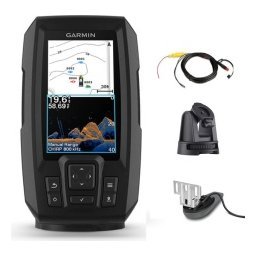
Garmin Striker and Vivid fish finders
Many anglers meet Garmin first through its compact fish finders. Our Garmin Striker Vivid guide looks at this family in detail.
Who they suit
These compact units suit beginners, small boats and anglers on a budget who still want GPS and CHIRP sonar.
What to check
Confirm screen size, sonar types, GPS features and the transducer in the box on the product page.
Chart and mapping features
Garmin units typically support built-in maps and optional charts.
Base maps
Base maps give general orientation and basic depth information.
Detailed charts
Detailed charts add contours and navigation aids, and they matter for large lakes and coastal water. Check which are available for your area.
Updating
Keep charts and software current for accuracy.
Sonar options
CHIRP
CHIRP sonar gives cleaner target separation. See our CHIRP fish finder article.
Imaging
Garmin offers imaging options on selected units. Check model details and read our side imaging vs down imaging guide.
Transducer matching
The right transducer is essential. Our transducer guide explains the types.
Screen sizes and mounting
Compact screens
Small boats benefit from compact screens.
Larger screens
Bigger boats can use larger screens for split views.
Mounting choices
Consider bracket and flush options. See our mount guide.
Choosing a Garmin unit for your boat
Kayak or small boat
A compact Garmin fish finder with GPS and a suitable transducer is a good starting point. See our kayak fish finder guide.
Fishing boat
A combo with CHIRP and imaging suits structure fishing.
Cruiser or larger boat
A larger chartplotter, possibly networked, supports longer trips.
Installing and setting up
Plan power
Use a fused supply and a suitable battery. See our boat wiring basics.
Mount transducer
Mount it in clean water. Read how to install a fish finder.
Configure the unit
Set units, language, transducer type and GPS.
Using Garmin GPS on the water
Mark and navigate
Mark waypoints at interesting spots and navigate back to them. Our waypoints guide explains how.
Use tracks
Track history shows where you have been.
Plan trips
Create routes to your favourite spots. See our trip planning with GPS guide.
Maintenance
- Rinse after saltwater use.
- Protect the screen from scratches.
- Update software and charts.
- Check cables and connectors.
Our marine electronics maintenance guide has more tips.
A practical shopping checklist
Use this checklist when you compare Garmin units, and keep notes as you go. Write down the screen size that fits your console and the sonar types you want. Check whether GPS is built in and which maps are included. Note what transducer comes in the box and how it mounts. Confirm the power requirements and whether you need a new battery or fuse. Add up the cost of any charts, mounts and cables you will need. Compare the total, not just the headline price of the display, and choose the unit that gives you the features you will really use.
Think about the next three seasons
It helps to buy for where you expect to be in a few seasons. If you plan to fish bigger water, add imaging or move to a larger screen, pick a unit that can grow with you. If you will always fish the same small lake, a simpler unit saves money you can spend on a better transducer or battery.
Safety and good practice with any GPS
A GPS is a navigation aid, not a guarantee. Always check the weather, carry a backup such as a compass or handheld GPS, and keep a lookout for hazards the chart may not show. Mark the launch point as a waypoint before you head out, and share your trip plan with someone ashore. Our guides on boat navigation safety basics and marine compass backup navigation cover these habits in detail.

Understanding what you get in the box
Product listings can look similar but include different parts, so read what comes with the unit. Some Garmin fish finders include a transducer, a mounting bracket and a power cable, while others sell parts separately. Chart cards, software updates and extra mounts may be extra. If any of these are unclear on a product page, ask us before you order and we will help you check, so you receive everything you need to get on the water.
Check the sonar and transducer pairing
The display and the transducer must be compatible and must offer the sonar views you want. If you intend to use imaging, make sure the included transducer supports it. A standard transducer will still provide depth and 2D sonar, but it will not give imaging, so confirm this before you buy.
Plan the whole install
Think about where the cables will run, how the transducer will mount and whether your battery is up to the job. A neat installation protects your investment and prevents the noisy readings that frustrate new owners. Our fish finder installation guide walks through the steps in order.
Garmin GPS for different anglers
Different anglers will use Garmin GPS in different ways. A bank angler with a small boat may value simplicity and a bright screen. A tournament angler may want fast chart redraw and networking. A family boater may focus on navigation safety and ease of use for everyone on board. Knowing your own priorities makes the product page much easier to read, and it keeps you from paying for features that will never matter to you.
Getting started in your first week
The first week with a new unit sets the pattern for how well you use it. On day one, install and test it at home or at the dock, checking that the unit powers on, finds satellites and recognises the transducer. On the first trip, stay on familiar water and keep the settings simple, using automatic sonar modes and a basic chart view. On the second trip, start adjusting range, gain and screen layouts one at a time so you can see what each change does. By the end of the week you should know how to mark a waypoint, navigate to it and read depth and bottom type confidently.
Keep a short notes file
Write down the settings that worked and the waypoints you made. A few lines in a notebook or phone save you from re-learning the same lessons next season, and they make it easy to ask for help if something behaves unexpectedly.
Comparing Garmin with other brands
It is natural to compare Garmin with other marine brands before you decide. Lowrance, Humminbird, Furuno and Simrad all offer strong products, and each has its own interface and ecosystem. Rather than asking which brand is best, ask which interface you find clearest, which charts are available for your waters and which unit fits your console and your budget. Our guides to Lowrance vs Humminbird and Furuno and Simrad marine electronics provide more context to help you compare fairly.
Frequently asked questions
Is Garmin good for fishing?
Many anglers use Garmin fish finders and chartplotters successfully. Choose a model with the sonar features you need.
Are Garmin units waterproof?
Marine units are designed to resist spray, but check each model’s rating.
Do I need extra charts?
Detailed charts are helpful on large water. Check what is included.
Can I use Garmin with other brands?
Compatibility varies, so check before mixing.
Summing up
The best Garmin marine GPS for you depends on your boat, your water and the way you fish. Compare screen size, sonar, charts and installation needs, and choose a unit that you will enjoy using. Browse Garmin products in our shop or contact us for help.
Related reading from Fishtrail Outfitters
- Fish Finder Chartplotter Combo: Is an All-in-One Unit Right for You?
- Garmin Striker Vivid Fish Finder Guide: Bright Screens and Simple Sonar
- Fish Finder vs GPS Marine: Which Category Do You Need First?
- Trolling With a Fish Finder: Use Sonar and GPS to Troll Smarter
Products mentioned in this guide
- Fishfinder Garmin Striker Vivid 4CV + Sonar 77/200/455/800 KHz
- Fishfinder Garmin Striker Vivid 5CV + Sonar 77/200/455/800 KHz
- Fishfinder Garmin Striker Vivid 7CV + Sonar 77/200/455/800 KHz
Further reading: U.S. Coast Guard Navigation Center · Take Me Fishing: how to get started and where to fish
Questions before you buy? Contact Fishtrail Outfitters or browse the shop.