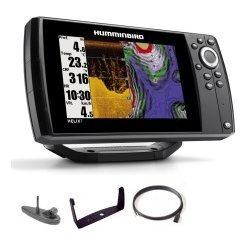
A GPS anchor alarm is one of the simplest and most valuable safety features on a modern chartplotter or GPS unit, and many boaters never switch it on. When you drop anchor, the unit records your position and sounds an alert if your boat drifts beyond a radius you set, giving you a chance to react before the anchor drags into trouble. Alongside the anchor alarm, other alarms, such as shallow-water, off-course, arrival and low-battery alerts, act as a second set of eyes. This guide explains how a GPS anchor alarm works, how to set it, how to choose the right radius, which other alarms matter, how to avoid false alarms, and how to combine alarms with good seamanship and a proper lookout.

How a GPS anchor alarm works
Recording your position
When you set the alarm, the unit saves your current position as the centre point. It then compares each GPS fix to that point.
A circle of safety
You choose a radius. If the boat moves outside that circle, the alarm sounds. The circle should be large enough for normal swing but small enough to warn you early.
What it does not do
The alarm tells you the boat moved, not why. It does not replace a well-set anchor, enough scope and a lookout.
Why use it
Early warning of dragging
Anchors can drag due to wind shifts, tidal changes or a poor seabed. An alarm helps you notice before you hit something.
Peace of mind while fishing or resting
Anchored boats often have people dozing, fishing or cooking. An alarm gives you confidence that someone will be alerted.
Useful at night
At night, it is hard to see landmarks, and an alarm gives an objective check.
Set the alarm correctly
Anchor first, set the alarm second
Set your anchor properly, let the boat settle and check that it holds. Then set the alarm.
Choose the radius
The radius should allow for swing based on scope and depth, plus GPS accuracy, but not so large that you are far off before the alarm sounds. Start with a radius slightly larger than your swing circle and adjust.
Check the sound level
Make sure you can hear it from where you sleep or sit. Test it.
Name the alarm point
Mark the anchor position as a waypoint so you can see it on the chart.
Other alarms worth using
Shallow-water alarm
It warns you when depth drops below your set value. Choose a depth that gives time to react for your boat’s draft.
Deep-water alarm
Useful for staying on a ledge or avoiding drop-offs.
Off-course (cross-track) alarm
It alerts you if you drift off a planned route. See our plan a fishing trip with GPS guide.
Arrival alarm
It signals when you reach a waypoint.
Battery and power alarms
Low-voltage alerts help you avoid running down the battery. See our boat wiring basics guide.

Avoid false alarms
GPS accuracy
GPS positions can wander by small amounts, so do not set the radius too tight.
Wind and current
Boats swing around the anchor. Make sure the radius allows for swing in all directions.
Check settings after changes
If you change scope or move the anchor, reset the alarm.
Do not ignore alarms
False alarms are annoying, but ignoring them is dangerous. Adjust settings rather than silencing alarms permanently.
Combine alarms with good seamanship
Set the anchor properly
Use a suitable anchor, enough scope and a good seabed. Check holding by watching marks on land or on your chart.
Keep a lookout
Alarms help, but you still need to watch weather and other boats. See our boat navigation safety basics.
Know the forecast
Wind shifts often cause dragging. Check the forecast before you anchor overnight.
Use backup methods
A handheld GPS, a compass bearing to a landmark or a second device give extra checking. See our marine compass backup guide.
Fishing and the anchor alarm
Hold a spot
If you fish at anchor, the alarm helps you notice drift off the fish.
Mark productive anchors
Save the position when you anchor on a good spot. See our marine GPS waypoints guide.
Respect other boats
Anchor at a safe distance and avoid blocking channels.
Common mistakes
- Setting the radius too tight or too wide.
- Not testing the sound.
- Forgetting to reset the alarm after moving.
- Relying on the alarm instead of watching.
- Anchoring with too little scope.
A step-by-step anchoring routine
Approach the spot slowly into the wind or current, and stop the boat. Lower the anchor, rather than throwing it, and let out line as the boat drifts back. When you have enough scope, snub the line gently, then watch to see whether the anchor holds. Check your position against fixed landmarks or the chart. Once you are satisfied, switch on the GPS anchor alarm, choose a radius and test the sound. Record the anchor position as a waypoint. Settle in, and check the weather and your position at regular intervals. When you leave, switch the alarm off and retrieve the anchor carefully.
Consider the crew
Make sure everyone on board knows how to react to an alarm. Explain what it means, and who will start the engine and retrieve the anchor if necessary. A short briefing means that an alarm leads to action, not confusion.
Keep spare power available
A GPS alarm needs a working device and power. Check your battery before settling for the night, and consider a backup device with its own battery. Our fish finder battery guide and GoPro battery tips provide general power-planning ideas that apply to any electronics.
Alarms for other situations
Some units allow custom alarms for speed, such as a maximum speed in a no-wake area, or for water temperature changes that signal a thermocline or a current seam. Others let you set a timer. Learning what your unit offers can add useful tools for fishing and safety. Review the manual, test each alarm at the dock and choose the few that make sense for how you boat. Too many alarms create noise, so keep the list short and meaningful.
Frequently asked questions
Does every chartplotter have an anchor alarm?
Many do. Check your model.
How large should the radius be?
Large enough for swing and GPS wander, but small enough to warn early.
Can I use my phone as an anchor alarm?
Some apps work, but keep a dedicated device if possible.
What if the alarm sounds?
Check position, weather and anchor, and be ready to reset or leave.
Let the alarm watch while you rest
A GPS anchor alarm and other boat safety alarms add a layer of protection to every trip. Set them carefully, test them and use them as part of good seamanship. Browse GPS units and chartplotters with alarm features in our shop and contact us for help choosing a unit.
Related reading from Fishtrail Outfitters
- Offshore Fishing Electronics Guide: Sonar, GPS and Safety Gear for Bigger Water
- Handheld Marine GPS vs Chartplotter: Which Do You Need on the Water?
- Sailboat and Cruiser Electronics Basics: Depth, GPS and Backup Navigation
- Marine GPS Chartplotter Buying Guide: Features, Sizes and What to Skip
Products mentioned in this guide
- Fishfinder Furuno FCV 600
- Fishfinder Furuno FCV 800
- Lowrance Eagle 5 CHIRP Splitshot Gps Fishfinder + 455/800 KHz Transducer
Further reading: U.S. Coast Guard Navigation Center · U.S. Coast Guard boating safety resources
Questions before you buy? Contact Fishtrail Outfitters or browse the shop.