Few places benefit more from action cameras than a paddle craft, and GoPro kayak fishing setups let you record strikes, landings and the quiet beauty of early mornings without ever putting a rod down. But a kayak is a tight, wet, unstable platform, so mounts must be compact, secure and out of the way of lines and paddles, and every piece of gear needs a tether. This guide explains how to choose and place camera mounts on a kayak, the best camera angles for fishing, how to tether and protect gear, how to manage power and storage, how to avoid tangles and capsize risks, and how to review your footage. It builds on our other camera guides and keeps safety first, because on a kayak, a lost camera is the least of your worries.

GoPro kayak fishing: choose low-profile mounts
Why low profile matters
Fishing lines, paddles and rods can snag on tall mounts. Keep mounts low and clean.
Track and scupper mounts
Many kayaks have tracks or scupper holes that accept mounts. These are secure and quick to move.
Adhesive and clamp mounts
Adhesive mounts on flat surfaces and small clamps on rails or paddles are options. See our GoPro boat mount guide for details.
The best camera angles from a kayak
Behind-the-angler view
A camera behind your seat shows casting, fights and landings.
Bow view
A forward-facing camera shows the paddle stroke and the water ahead.
Rod tip view
A camera near the rod holder shows strikes. Keep it clear of the reel.
First-person view
A chest mount gives your point of view. See our GoPro chest mount guide.
Tether everything
Why tethers matter
A camera on a kayak can go overboard quickly. A floating tether keeps it from sinking. See our floating case and handle guide.
Use short, tidy tethers
Short tethers prevent tangles. Route them away from fishing lines.
Tether other gear
Rods, paddles, phones and electronics need tethers too.
Power and storage on a kayak
Battery planning
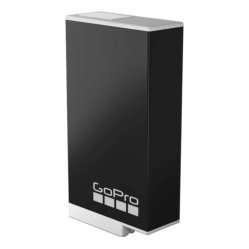
Carry spare batteries in a dry bag. See our GoPro battery tips.
Power handle or power bank
For long days, a power handle or bank helps. See our power handle guide.
Memory cards
Use fast, reliable cards, and carry a spare. See our memory card guide.
Protect the camera
Waterproofing and seals
Check seals before every trip. Rinse after salt. See our saltwater protection guide.
Lens clarity
Wipe the lens often. Use anti-fog inserts if needed.
Shade and heat
Keep the camera out of direct sun when not recording.

Combine with other kayak electronics
Fish finder
A kayak fish finder helps you find fish, and a camera records the catch. See our kayak fish finder guide.
GPS and waypoints
Mark spots where you filmed good footage. See our marine GPS waypoints guide.
Wiring and power
Keep cables tidy and dry. See our boat wiring basics guide.
Safety on a kayak
Wear a life jacket
Always wear one. See our solo fishing safety guide.
Keep the camera from becoming a hazard
Do not mount anything that can catch on you in a capsize.
Practise re-entry
Practise getting back on your kayak with your gear in place.
Watch the weather
Wind and waves change quickly on open water.
Camera settings for kayak fishing
Stabilisation
Turn it on. See our GoPro settings guide.
Resolution and frame rate
Moderate settings save battery.
Clean audio
Use wind reduction.
Review and improve
Check footage after each trip
Look for shake, glare and bad angles.
Adjust mounts
Move the camera, adjust tilt and test again.
Edit and share
See our fishing video tips and editing guide.
Common mistakes
- Mounting tall or loose.
- Forgetting tethers.
- Not checking seals.
- Letting lines tangle around the camera.
- Ignoring safety.
A step-by-step kayak camera setup
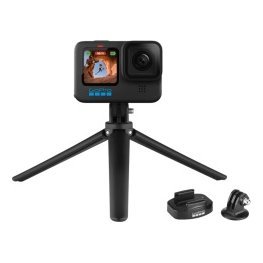
Start at home by laying out your kayak and gear. Decide on two camera positions: behind the seat and on the bow or near the rod holder. Fit the mounts first, using tracks or adhesive pads where appropriate, and then attach the cameras. Add tethers from each camera to a fixed point on the kayak, leaving enough slack for movement but not enough for tangles. Check that the cameras do not interfere with paddle strokes, line casting or rod handling. Sit in the kayak and simulate casting, paddling and landing a fish to test clearances. Adjust, tighten and test in shallow water before heading out. Finally, record a short clip to check angle and view.
Pack a small camera kit
A dry bag with spare batteries, a memory card, a cloth, a spare mount and a power bank covers most issues. Keep it within reach but secured.
Use a quick-release system
A quick-release plate on each mount lets you remove cameras quickly for transport and protects them from theft. It also allows you to swap angles during the day.
Fishing from a kayak with a camera: etiquette
Keep respect for others on the water. Avoid pointing cameras at people who have not agreed to be filmed, and be careful not to disturb wildlife. When filming fish, handle them gently and release them quickly. Our photographing your catch responsibly guide explains good practice. Share the water, share the stories and let your footage show the best side of the sport.
Keeping the cockpit tidy
A kayak has little spare room, so plan where each item lives. Rods go in holders or bungee-secured tubes, the paddle clips to a keeper when you fish, and cameras stay on their mounts. Route tether lines along the hull edge rather than across the deck, and use small clips so you can detach a camera in seconds. Before launching, shake the boat gently in shallow water and watch for loose items. A tidy cockpit protects your footage, your gear and your balance, and it makes landing a fish far less stressful when the moment comes.
Frequently asked questions
Where should I mount a GoPro on a kayak?
Low and secure, such as on a track or behind the seat.
Will the camera slow me down?
A small camera adds little weight and drag.
Do I need a floating handle?
It is a good idea.
Can I film while paddling?
Yes, with a secure mount.
Film your paddle days
A thoughtful GoPro kayak fishing setup records your adventures without adding risk. Choose low mounts, tether everything and check your gear every trip. Browse GoPro accessories in our shop and contact us for help choosing mounts.
Related reading from Fishtrail Outfitters
- GoPro Chest Mount for First-Person Fishing Video: Setup and Tips
- Best GoPro for Fishing: What to Look For and How to Set It Up
- GoPro Boat Mount Guide: Where to Attach Your Camera for Great Fishing Video
- GoPro Fishing Accessories: The Essential Kit for Anglers
Products mentioned in this guide
Further reading: GoPro official website · Take Me Fishing: how to get started and where to fish
Questions before you buy? Contact Fishtrail Outfitters or browse the shop.